{{< include preamble.qmd >}}
```{r cyclamen-import}
#| include: false
cyclamen <- read_csv("data/cyclamen24.csv")
cyclamen$colour <- factor(cyclamen$colour)
cyclamen$group <- factor(cyclamen$group)
```
# Exploratory data analysis {#sec-eda}
Exploratory data analysis (EDA) is the process of understanding a data set before performing formal inference or fitting a statistical model. The goal is to identify the important features of the data (and any problems) early.
:::{.callout-tip}
## In practice, EDA answers questions like:
- What are the variables and units?
- How much missing data is there?
- What do the marginal distributions look like?
- Are there outliers or data errors?
- Which variables appear associated?
:::
## A first look in R
:::{.callout-note collapse="true"}
## Cyclamen Data
The **Cyclamen Data** contain 150 obs. of six features (sequence [], petal length [mm], petal width [mm], aperture diameter [mm], color [pink, white], and group [alpha, beta, gamma, delta, epsilon]) for *cyclamen hederifolium*. These measurements were taken by small groups of former MA22004 students using the same measurement protocol at the University Botanic Gardens in the autumn of 2024.
```{r cyclamen-glimpse}
#| echo: true
#| warning: false
#| error: false
cyclamen |> glimpse()
```
:::
A useful first step is to compute basic summaries and check that the categorical variables have the expected levels.
```{r cyclamen-summary}
#| echo: true
#| warning: false
#| message: false
cyclamen |> summary()
```
The summary above includes the sample mean of the continuous variables (e.g., `petal.width`) and the counts in each category for factors (e.g., `group`).
:::{.callout-warning}
## Missingness
In R, most functions will silently return `NA` if you have missing values. When computing summaries, decide in advance how you want to handle missingness (for example, removing incomplete rows for a particular calculation, or imputing missing values).
:::
A simple missingness check is:
```{r cyclamen-missingness}
#| echo: true
#| warning: false
#| message: false
cyclamen |> summarise(across(everything(), ~ sum(is.na(.))))
```
In EDA we typically combine numerical summaries with visual summaries. The next few sections outline basic visualisations.
## Histograms and boxplots
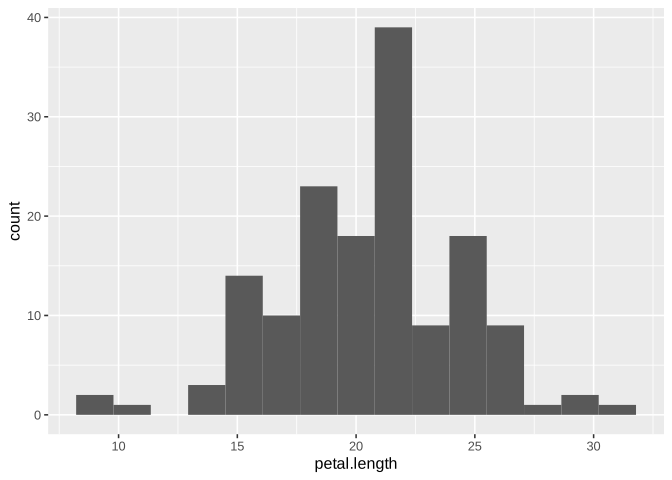
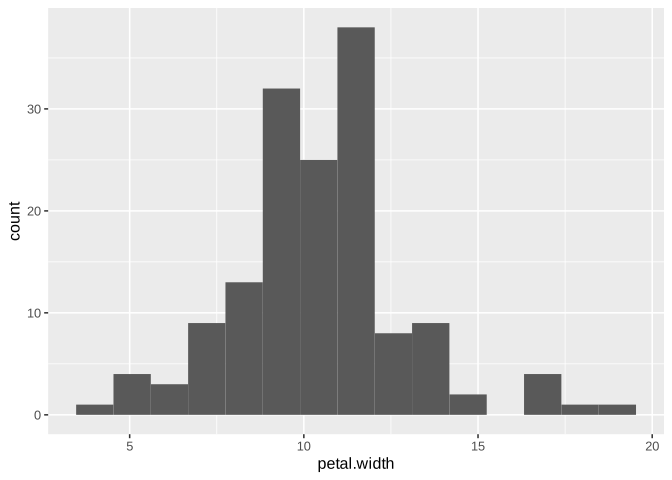
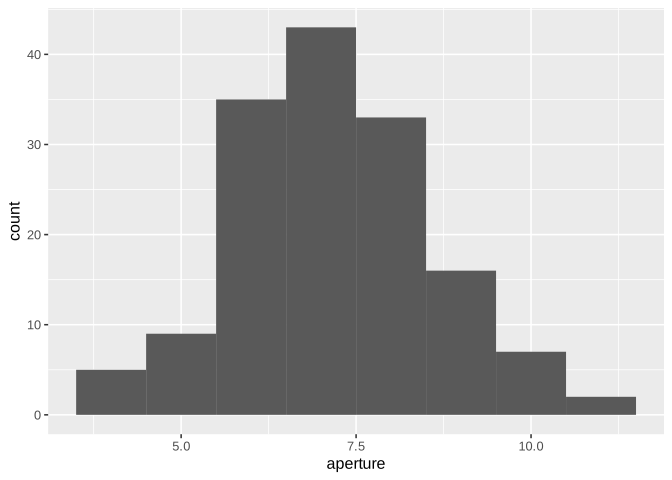
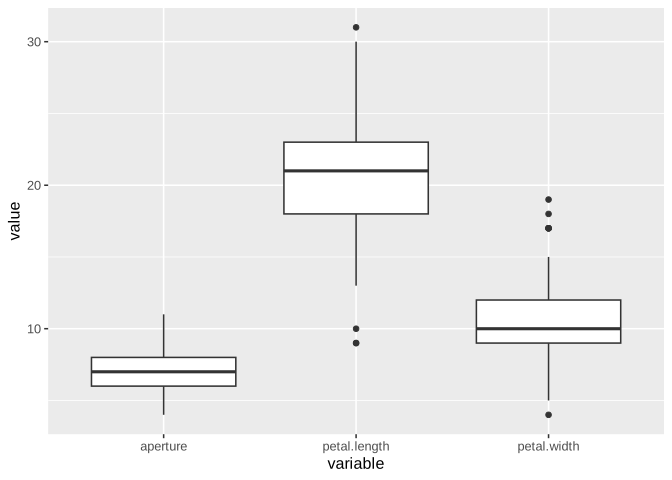
Below are some standard plots for petal measurements. Histograms help you see shape (symmetry, skewness, multimodality), and boxplots highlight spread and potential outliers.
```{r cyclamen-hist-l}
#| echo: true
#| warning: false
#| message: false
cyclamen |>
    ggplot(aes(x = petal.length)) +
    geom_histogram(bins = 15)
```
```{r cyclamen-hist-w}
#| echo: true
#| warning: false
#| message: false
cyclamen |>
    ggplot(aes(x = petal.width)) +
    geom_histogram(bins = 15)
```
```{r cyclamen-hist-a}
#| echo: true
#| warning: false
#| message: false
cyclamen |>
    ggplot(aes(x = aperture)) +
    geom_histogram(bins = 8)
```
```{r cyclamen-boxplot}
#| echo: true
#| warning: false
#| message: false
cyclamen |>
    pivot_longer(cols = c(petal.length, petal.width, aperture),
        names_to = "variable",
        values_to = "value") |>
            ggplot(aes(x = variable, y = value)) +
            geom_boxplot()
```
:::{.callout-note}
## Outliers are not necessarily errors
A point that looks like an outlier is not automatically a data *error*. It may be a legitimate observation (for example, an unusually large flower), but it is always worth checking whether the measurement could have been recorded incorrectly (for example, were the correct units used).
:::
## Comparing groups
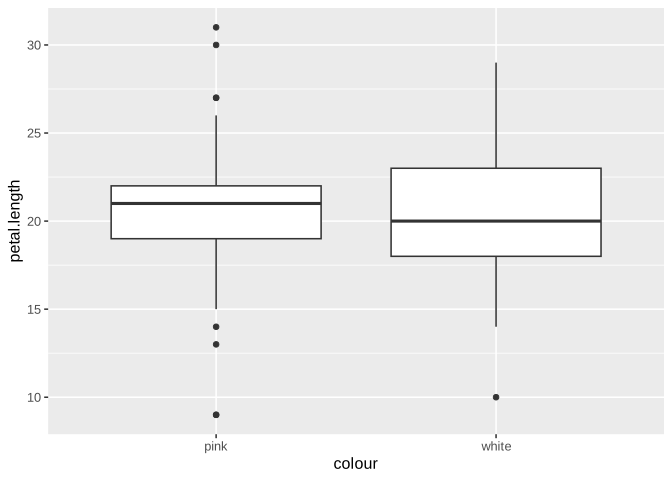
A common EDA question is whether distributions differ across a group variable. Here, color is a natural grouping to start with.
```{r cylcamen-boxplot-colour}
#| echo: true
#| warning: false
#| message: false
cyclamen |>
    ggplot(aes(x = colour, y = petal.length)) +
    geom_boxplot()
```
## Relationships between variables
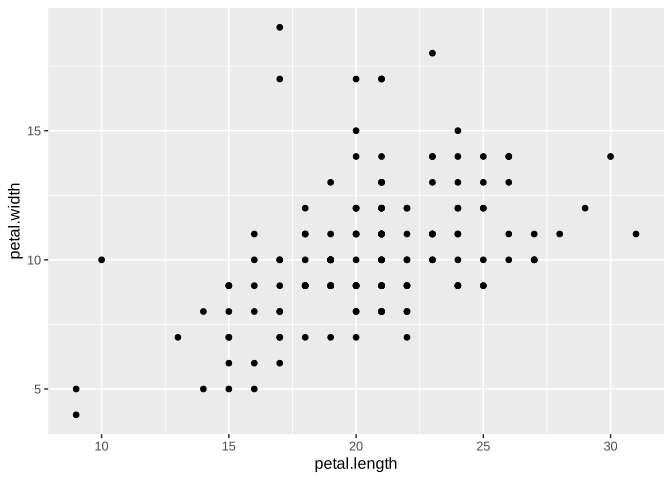
For two numerical variables, a scatter plot is usually the first plot to make.
```{r cyclamen-scatter}
#| echo: true
#| warning: false
#| message: false
cyclamen |>
    ggplot(aes(x = petal.length, y = petal.width)) +
    geom_point()
```
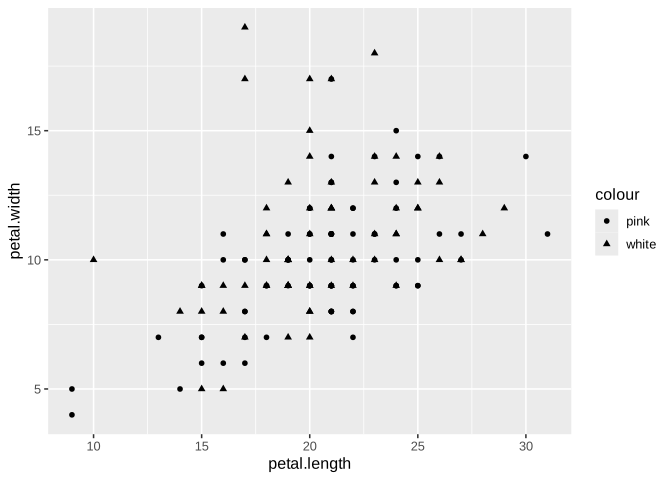
Sometimes it is helpful to add a grouping variable (here: `colour`) to see whether patterns differ between groups.
```{r cyclamen-scatter-colour}
#| echo: true
#| warning: false
#| message: false
cyclamen |>
    ggplot(aes(x = petal.length, y = petal.width, shape = colour)) +
    geom_point()
```
## Correlation as a summary of association
Correlation coefficients give a one-number summary of association between two numerical variables. Correlation does not imply causation!
In this module, we will use three common correlation coefficients:
- **Pearson** correlation measures linear association (it is the default and is most directly connected to linear regression).
- **Spearman** correlation measures monotone association by applying Pearson correlation to the ranks of the data.
- **Kendall** correlation (Kendall's $\tau$) measures association using concordant and discordant pairs, and also measures monotone association.
In EDA, it is common to compute Pearson, Spearman, and Kendall correlations together. If Pearson is small but Spearman/Kendall are large (in magnitude), that often suggests a relationship that is monotone but not well-approximated by a straight line.
:::{.callout-tip}
## A good EDA habit
1. Make a scatter plot first.
2. Compute Pearson correlation.
3. If the relationship looks monotone but not linear, or if outliers look influential, also compute Spearman and Kendall as a sensitivity check.
:::
```{r fig-cyclamen-pairwise-scatter}
#| echo: false
#| warning: false
#| message: false
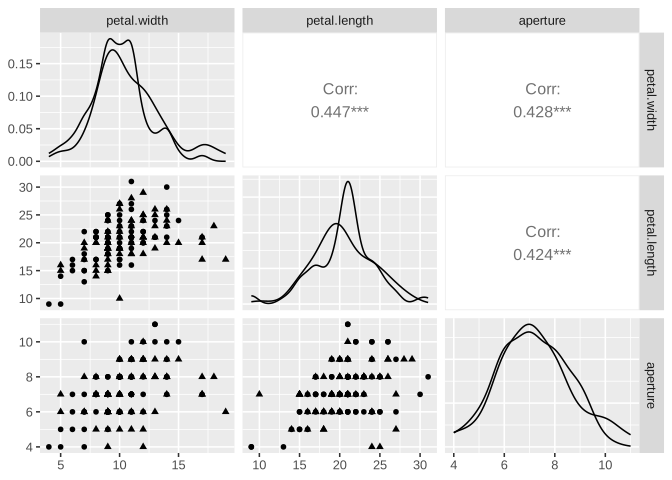
#| fig-cap: "Pairwise scatterplot matrix for cyclamen petal width, petal length, and aperture diameter (using `GGally:ggpairs`). Points are shaped by flower colour. The diagonal panels show each variable's distribution (one density per colour); the upper panels summarise pairwise association using the *Pearson* correlation."
library(GGally)
cyclamen |>
select(petal.width, petal.length, aperture, colour) |>
ggpairs(
columns = c("petal.width", "petal.length", "aperture"),
mapping = aes(shape = colour)
)
```
The built-in function `cor` can be used to compute different correlation coefficients by specifying the method. For the cyclamen data, we will compute correlations between the three numerical flower measurements (here we exclude `sequence`, which is an index rather than a flower measurement).
```{r cyclamen-num}
#| echo: true
#| warning: false
#| message: false
cyclamen_num <- cyclamen |>
    select(petal.width, petal.length, aperture)
```
### Pearson correlation matrix
```{r cyclamen-pearson}
#| echo: true
#| warning: false
#| message: false
cor(cyclamen_num, use = "complete.obs", method = "pearson")
```
### Spearman correlation matrix
```{r cyclamen-spearman}
#| echo: true
#| warning: false
#| message: false
cor(cyclamen_num, use = "complete.obs", method = "spearman")
```
### Kendall correlation matrix
```{r cyclamen-kendall}
#| echo: true
#| warning: false
#| message: false
cor(cyclamen_num, use = "complete.obs", method = "kendall")
```
If Pearson is close to $0$ but Spearman/Kendall are not, that often suggests a relationship that is monotone but not well-approximated by a straight line. If Pearson differs substantially from Spearman/Kendall, it is also worth checking for outliers.
## Principal Component Analysis
Principal Component Analysis (PCA) is an exploratory technique for understanding variation in multivariate numerical data. It constructs new variables (principal components) which are linear combinations of the original variables and which capture decreasing amounts of variation.
For cyclamen, we will apply PCA to the three numerical flower measurements: petal width, petal length, and aperture diameter.
:::{.callout-warning}
## Rescaling
PCA is sensitive to the scale of the variables. When variables are measured on different scales (or have very different spreads), it is standard practice to *standardise* them before doing PCA. In `prcomp`, this is done with `scale. = TRUE`.
:::
```{r cyclamen-pca}
#| echo: true
#| warning: false
#| message: false
cyclamen_pca <- cyclamen |>
    select(petal.width, petal.length, aperture, colour)

pca_fit <- cyclamen_pca |>
    select(!colour) |>
    prcomp(scale. = TRUE)

summary(pca_fit)
```
### Understanding the PCA summary
For three variables, PCA produces three principal components (PC1, PC2, PC3). The `summary()` output reports:
- **Standard deviation** of each principal component: this is the spread of the data along that component.
- **Proportion of Variance** explained by each component: the fraction of the total variability captured by that component.
- **Cumulative Proportion** or the fraction captured by the first $k$ (reading left to right across the table).
In particular, the variance explained by PC$k$ is `pca_fit$sdev[k]^2`, and the proportion of variance explained is obtained by dividing by the total:
$$\mathrm{PVE}_k = \frac{\mathrm{sdev}_k^2}{\sum_{j=1}^3 \mathrm{sdev}_j^2} \,.$$
Because we used `scale. = TRUE`, each original variable is standardised to have variance $1$, so the total variance is approximately $3$ (up to rounding). This is why $\sum_{k=1}^3 \mathrm{sdev}_k^2 \approx 3$.
For the cylcamen data, the summary output shows:
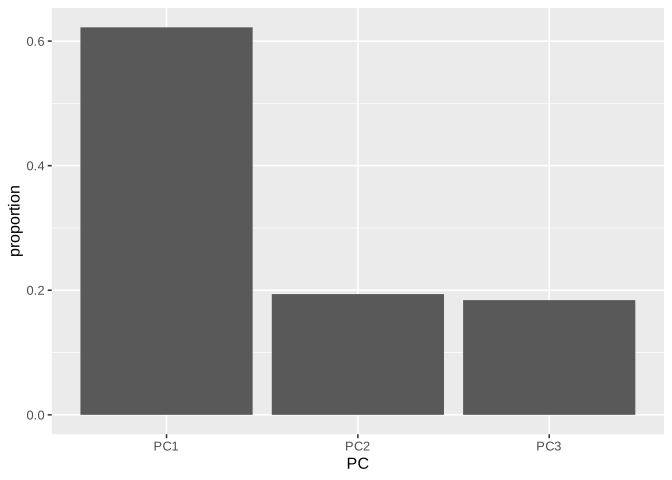
- PC1 explains about $62.2\%$ of the variation in the three measurements.
- PC2 explains about $19.4\%$, and PC3 about $18.4\%$.
- The first two components together explain about $81.6\%$ of the variation.
```{r pca-tbl}
#| echo: true
#| warning: false
#| message: false
pca_var <- pca_fit$sdev^2
pca_pve <- pca_var / sum(pca_var)

pve_tbl <-
    tibble(
        PC = factor(paste0("PC", seq_along(pca_pve)),
        levels = paste0("PC", seq_along(pca_pve))),
        proportion = pca_pve,
        cumulative = cumsum(pca_pve)
        )

pve_tbl
```
```{r fig-cyclamen-scree}
#| echo: false
#| warning: false
#| message: false
#| fig-cap: "**Scree plot**: proportion of variance explained by each principal component in the cyclamen PCA."
pve_tbl |>
ggplot(aes(x = PC, y = proportion)) +
geom_col()
```
### PCA scores plot
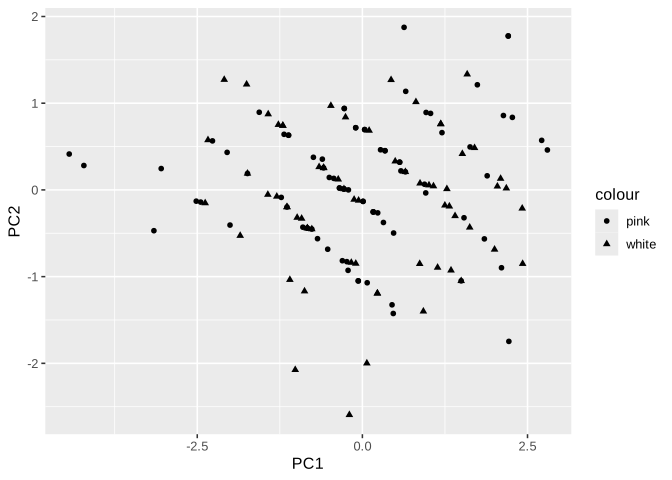
A useful EDA plot is the projection of the observations onto the first two principal components. Here we colour by `colour` to check whether colour is associated with the main modes of variation in the measurements.
```{r pca-scores}
#| echo: true
#| warning: false
#| message: false
scores <-
    as_tibble(pca_fit$x) |>
    bind_cols(cyclamen_pca |> select(colour))

scores |>
    ggplot(aes(x = PC1, y = PC2, shape = colour)) +
    geom_point()
```
The scatter plot above displays cyclamen PCA scores (PC1 vs PC2). Each point is a flower; points are shaped by flower colour.
### Interpreting the principal components
To interpret the components, we examine the **loadings** (the coefficients defining each principal component as a linear combination of the original variables). In `prcomp`, these are stored in `pca_fit$rotation`.
```{r pca-loadings}
#| echo: true
#| warning: false
#| message: false
as_tibble(pca_fit$rotation, rownames = "variable")
```
A loading with larger magnitude means that the corresponding variable contributes more strongly to that principal component.
:::{.callout-warning}
## PCA is not a hypothesis test
PCA is an exploratory tool to help you describe patterns and identify dominant directions of variation. A common outcome is dimension reduction: here, PC1 and PC2 capture about $81.6\%$ of the variation, so a two-dimensional view retains most of the information in the three measurements.
:::